Cloud Engineer Academy Module 4 Blog - Linux and Bash chmod
linuxclibashmodule 4cloudengineeringacademy
793 Words - Read time = 3 Minutes, 36 Seconds
2024-05-07 19:47 +0800
chmod numeric
chmod (change mode) is a command in Linux and other Unix-like operating systems that allows you to change the permissions (read, write, execute) of files and directories.
In Linux, permissions are represented by three sets of characters: user (owner), group, and others. Each set consists of three characters representing the read (r), write (w), and execute (x) permissions. These permissions can be represented numerically as well, where read=4, write=2, and execute=1.
Let’s break down chmod 777 and chmod 421:
-
chmod 777: This command sets the file permissions to allow read, write, and execute for the user, group, and others.- The first digit (7) refers to the permissions for the user/owner.
- The second digit (7) refers to the permissions for the group.
- The third digit (7) refers to the permissions for others.
Each digit is a sum of the permission values:
- 4 for read
- 2 for write
- 1 for execute
So, 7 represents read (4) + write (2) + execute (1), meaning all permissions are granted.
-
chmod 421: This command sets the file permissions differently.- The first digit (4) refers to the permissions for the user/owner.
- The second digit (2) refers to the permissions for the group.
- The third digit (1) refers to the permissions for others.
These values mean:
- For the user/owner: read (4)
- For the group: write (2)
- For others: execute (1)
So, chmod 421 grants read permission to the owner, write permission to the group, and execute permission to others.
Common numeric representations in chmod are used to set permissions on files and directories in Linux and other Unix-like operating systems. Here are some common ones:
-
chmod 777: This gives full permissions to the owner, group, and others.
- The first digit (7) represents permissions for the owner (user).
- The second digit (7) represents permissions for the group.
- The third digit (7) represents permissions for others.
- In binary, 7 translates to 111, indicating read (4) + write (2) + execute (1) permissions for each category.
-
chmod 755: This gives the owner full permissions and read/execute permissions to the group and others.
- The first digit (7) represents permissions for the owner (user).
- The second digit (5) represents permissions for the group.
- The third digit (5) represents permissions for others.
- In binary, 7 translates to 111 (read + write + execute), and 5 translates to 101 (read + execute).
-
chmod 644: This gives the owner full permissions and read-only permissions to the group and others.
- The first digit (6) represents permissions for the owner (user).
- The second digit (4) represents permissions for the group.
- The third digit (4) represents permissions for others.
- In binary, 6 translates to 110 (read + write), and 4 translates to 100 (read).
-
chmod 600: This gives the owner full permissions and no permissions to the group and others.
- The first digit (6) represents permissions for the owner (user).
- The second and third digits (0) represent no permissions for the group and others.
- In binary, 6 translates to 110 (read + write), and 0 means no permissions.
-
chmod 755: This gives the owner full permissions and read/execute permissions to the group and others.
- The first digit (7) represents permissions for the owner (user).
- The second digit (5) represents permissions for the group.
- The third digit (5) represents permissions for others.
- In binary, 7 translates to 111 (read + write + execute), and 5 translates to 101 (read + execute).
chmod symbolic links
In addition to numeric representations, chmod in Linux also supports symbolic representations. These representations are more intuitive and easier to understand for some users, especially when making specific changes to permissions.
Here’s how symbolic representations work:
- u stands for user/owner.
- g stands for group.
- o stands for others.
- a stands for all (equivalent to ugo).
And the symbols for permissions are:
- r stands for read.
- w stands for write.
- x stands for execute.
Here are a few examples:
-
To give the owner read and write permissions:
chmod u+rw filename -
To remove execute permission from the group:
chmod g-x filename -
To give everyone execute permission:
chmod a+x filename -
To give the owner read and execute permissions, and the group write permission:
chmod u+rx,g+w filename -
To set all permissions to just read and write:
chmod a=rw filename
So, instead of using numeric values like chmod 777 or chmod 421, symbolic representations allow you to specify the changes you want to make directly.
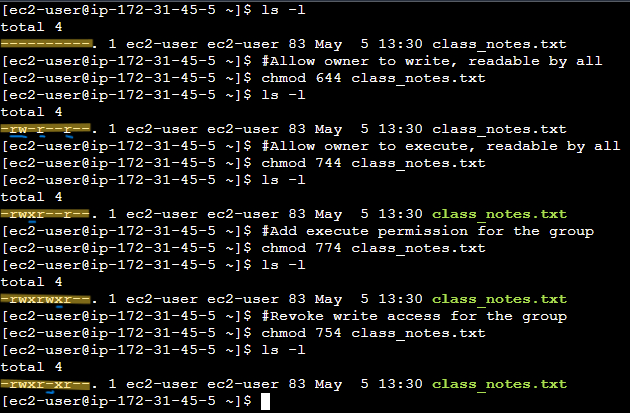
chmod exercise
Commands:
clear
ls -l
# Readable by all
chmod 444 class_notes.txt
ls -l
# Allow Owner to Write, readable by all
chmod 644 class_notes.txt
ls -l
# Allow owner to Execute, readable by all
chmod 744 class_notes.txt
ls -l
# Adding Execute Permissions for the Group
chmod 774 class_notes.txt
ls -l
# Revoking Write Access from the Group
chmod 754 class_notes.txt
ls -l
Results: